Look at how I write in my work inbox, then draft this reply in the same voice.
Mail
Scoped to one account. APPLE_MAIL_ACCOUNTS bounds what can be read, not just what can be written.
Cupertino puts the Apple apps on your Mac behind MCP, for any agent that speaks it. One Full Disk Access grant, held by a signed menu-bar app you can watch — instead of one for every editor that happens to spawn a server.
macOS 26 or later · 30-minute trial, no account · 30-day refund
MIT servers · unofficial, not affiliated with Apple
What did I promise Marie last week, and is any of it on my calendar?
What your agent called
reads only · one grant · nothing left the Mac
Every one of these carries a constraint — an account, a date bound, a filter. That is the part a shell script gets slowly or gets wrong, and the reason a server earns its place: it holds what the model would otherwise have to re-derive every session.
Look at how I write in my work inbox, then draft this reply in the same voice.
Scoped to one account. APPLE_MAIL_ACCOUNTS bounds what can be read, not just what can be written.
Pull together everything about the Atlas launch from my mail, my notes and my calendar. What do I still owe people?
Three surfaces, one grant — the payoff of shipping them in one bundle.
Find every unread message from my accountant this quarter.
A filter. This query shape costs 74 seconds over Apple Events; the index lane answers it in milliseconds.
What is actually on my calendar next week once the repeating meetings are expanded? Block two hours before the release.
Repeats expanded, and the window the answer covers reported with it — a short list is otherwise indistinguishable from a free afternoon.
Turn the action items from yesterday's client thread into reminders, due Friday.
Reads one surface, writes another. Both write gates off by default.
What did Marc say about the deposit? He texted me sometime last spring.
Searches by name rather than by phone number, and reads the messages SQL alone cannot see — since March 2026, that is all of them.
Did anyone ever reply to the invoice I sent on the 3rd?
The whole pitch, for someone who has never edited a config file.
Writes are off until you turn them on, per surface — and the toggle decides whether the mutating tools are registered at all, so an agent with writes off is never told they exist.
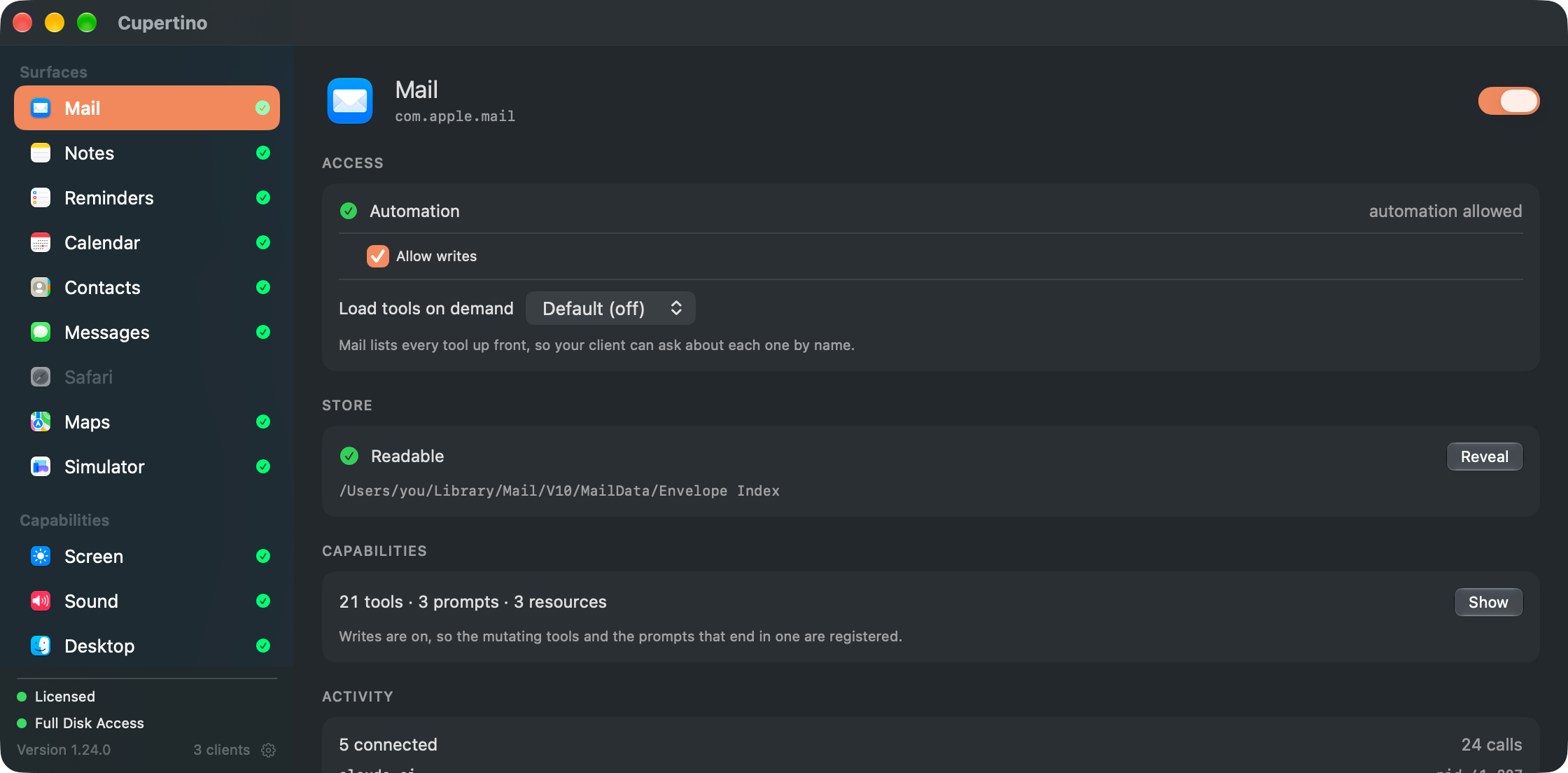
Every Apple app Cupertino brokers gets its own pane: whether it can be driven, whether its store can be read, who is talking to it, and what it can currently say.
 Thu 09:41
  Cupertino 12 servers running
 “What did Anna send me about the lease, and is it in my notes?”
Two different lanes, and it does not matter which. Mail came off the Envelope Index, because asking Mail.app the same thing takes 74 seconds. Notes came off Apple Events, because below roughly 5k notes the grant buys nothing there — so it is not asked for.
Full Disk Access is indivisible, and it lands on whatever process launched the server — your editor, your terminal, never Mail itself. A grant for mail is already a grant for Messages, Safari history and SSH keys. Granting it to Mail.app does nothing: the reader needs the permission, not Mail.
Cupertino.app
Automation is prompted separately, one row per target app. The bundle identifier io.mgcrea.cupertino is the TCC identity, so the grant
survives every update.
The tool list is a pure function of allowWrites and nothing else, because MCP clients cache it. With writes off the mutating tools are never registered
— the host cannot call what it was never told about, so there is nothing to refuse.
APPLE_MAIL_ALLOW_WRITES=
Mutation is one control. On Mail the larger blast radius is reading an entire archive — that is what *_ACCOUNTS is for, and it is enforced in exactly one place so no query path escapes it.
Every tool call, live, grouped by the client that made it. It is the answer to “what did the assistant just do with my mail?” — and the reason the servers run under an app you can see rather than inside whichever editor happened to spawn them.
The menu bar shows the same thing one level up: which client is talking to which server right now, and how many tools it has called. None of it is sent anywhere. The one connection Cupertino can make is the update check, it is off until you turn it on, and it carries no identifier — which CI checks against the built binary rather than the source.
By default none of it outlives the app. Turn on the audit log and it is kept on disk instead — append-only, each record hashed against the one before it, so an edited or missing line shows. That catches tampering by something that does not know it is a chain; it is not proof against anyone who can write the file, and the app says so in those words rather than implying more.
Cupertino runs as a menu-bar app you can open. That is the point of holding the servers in one signed process rather than spawning them inside whichever editor asked first: there is something to look at, and it tells you what happened.
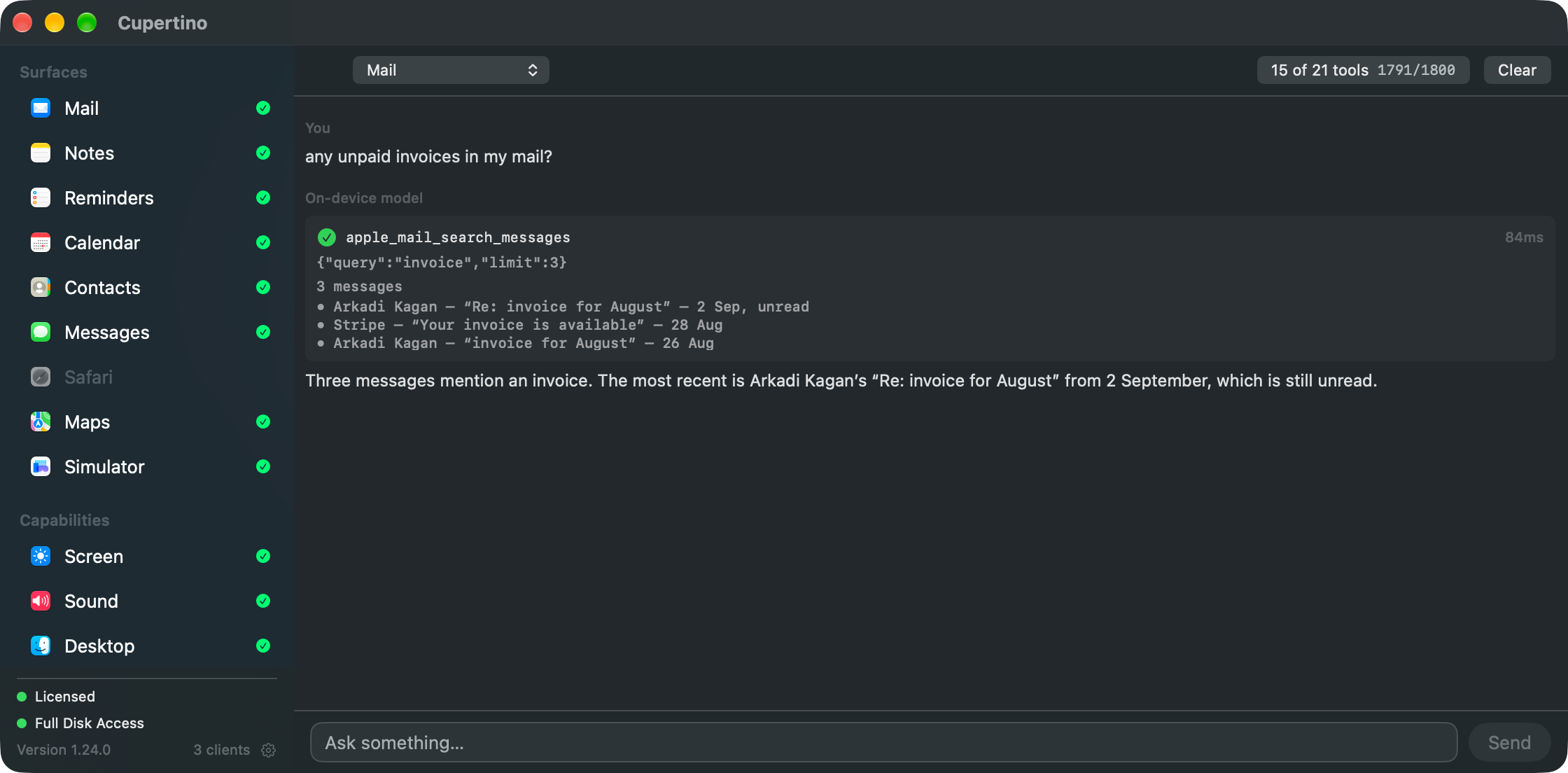
Pick a surface and ask in plain words. Apple's on-device model calls the same tools an editor would, over the same connection, and every call is shown with the arguments it invented — above the answer, because the calls are the evidence and the sentence is the model's account of them. The model holds 4,096 tokens, so the header says how much of that the loaded tools are spending. Nothing leaves the Mac, and it works before you buy a licence.
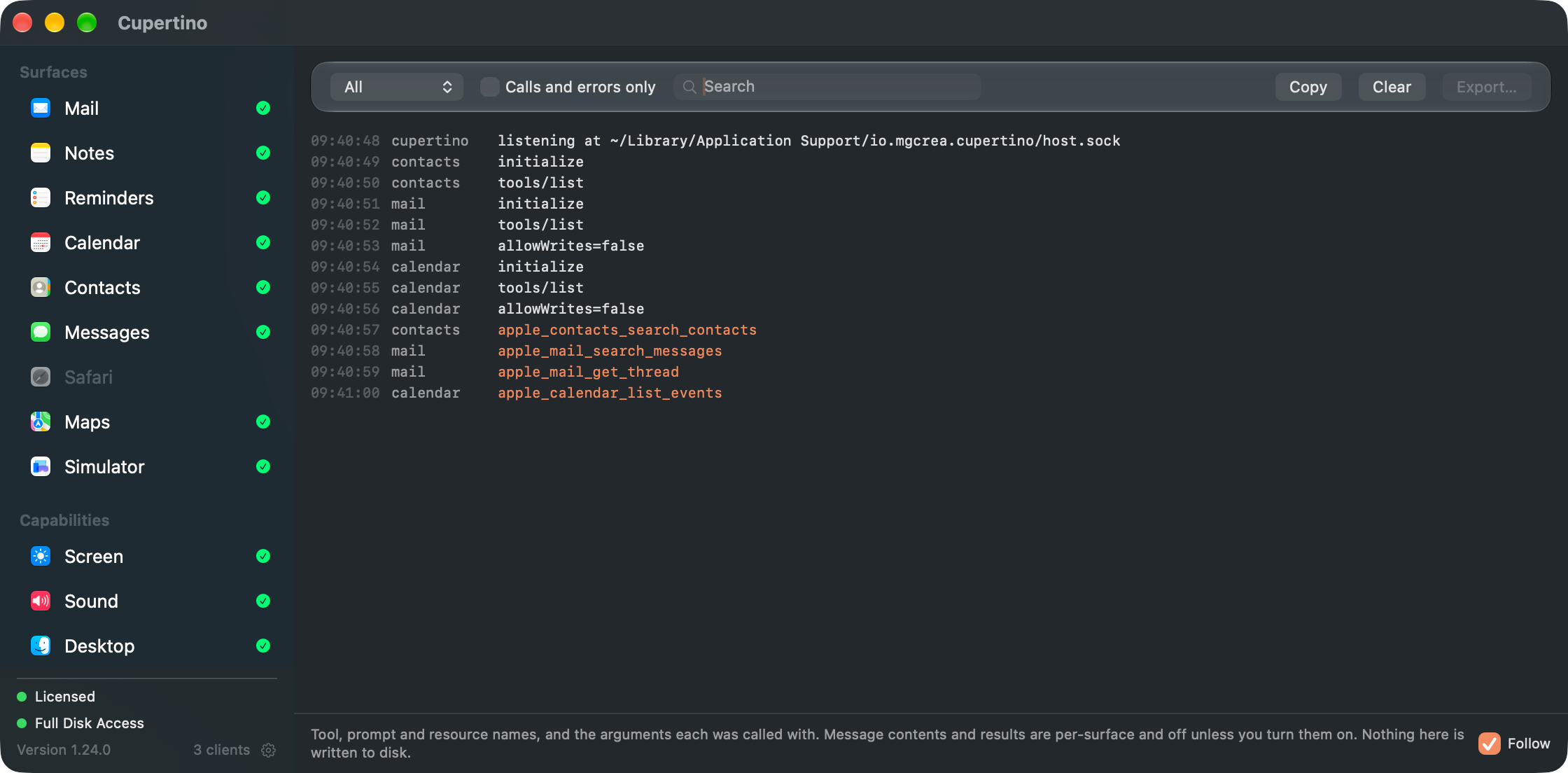
The same pane as below, seeded with a single turn: “What did I promise Marie last week, and is any of it on my calendar?” Contacts leads, because the question names a person and every other surface is addressed by handle.
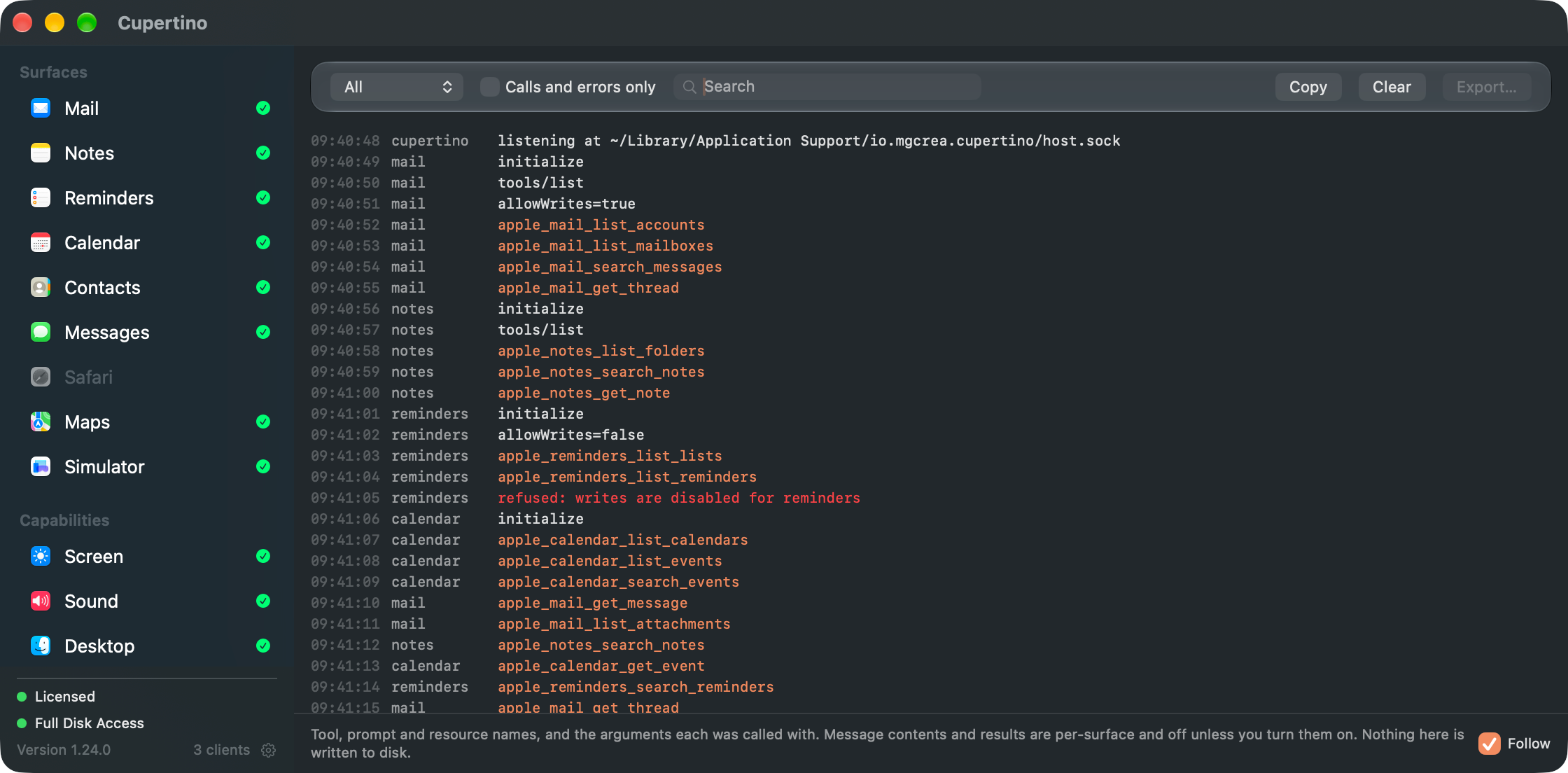
The same pane again, this time across everything a working day sends at it. Tool, prompt and resource names with the arguments each was called with — message contents and results stay off unless you ask for them — and a refused write shows up as a refusal.
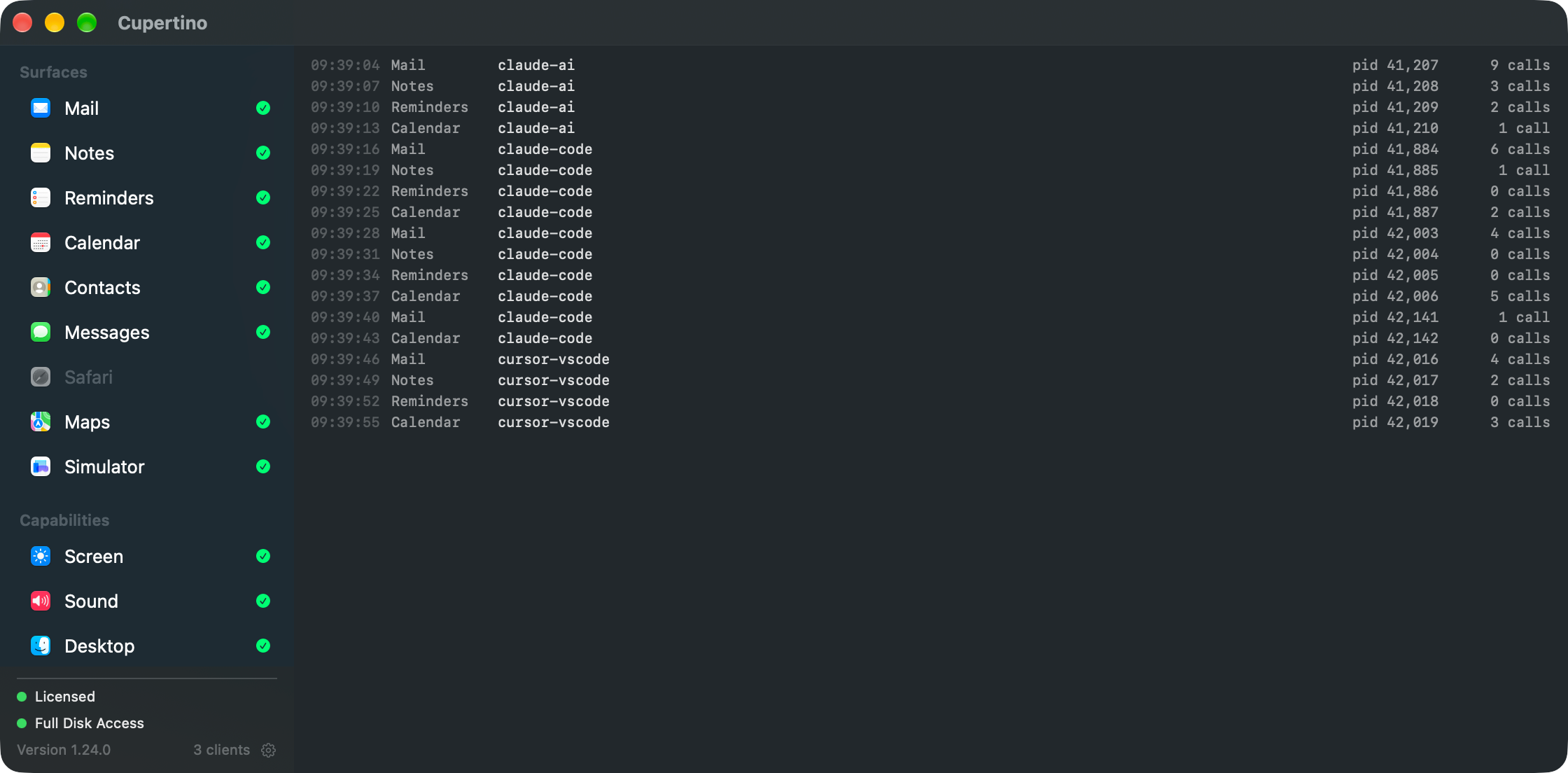
One row per connection, because each client opens one per server it is wired to — and a client you have run several times over opens several. Three clients is eighteen rows here, and this is the pane that shows them.
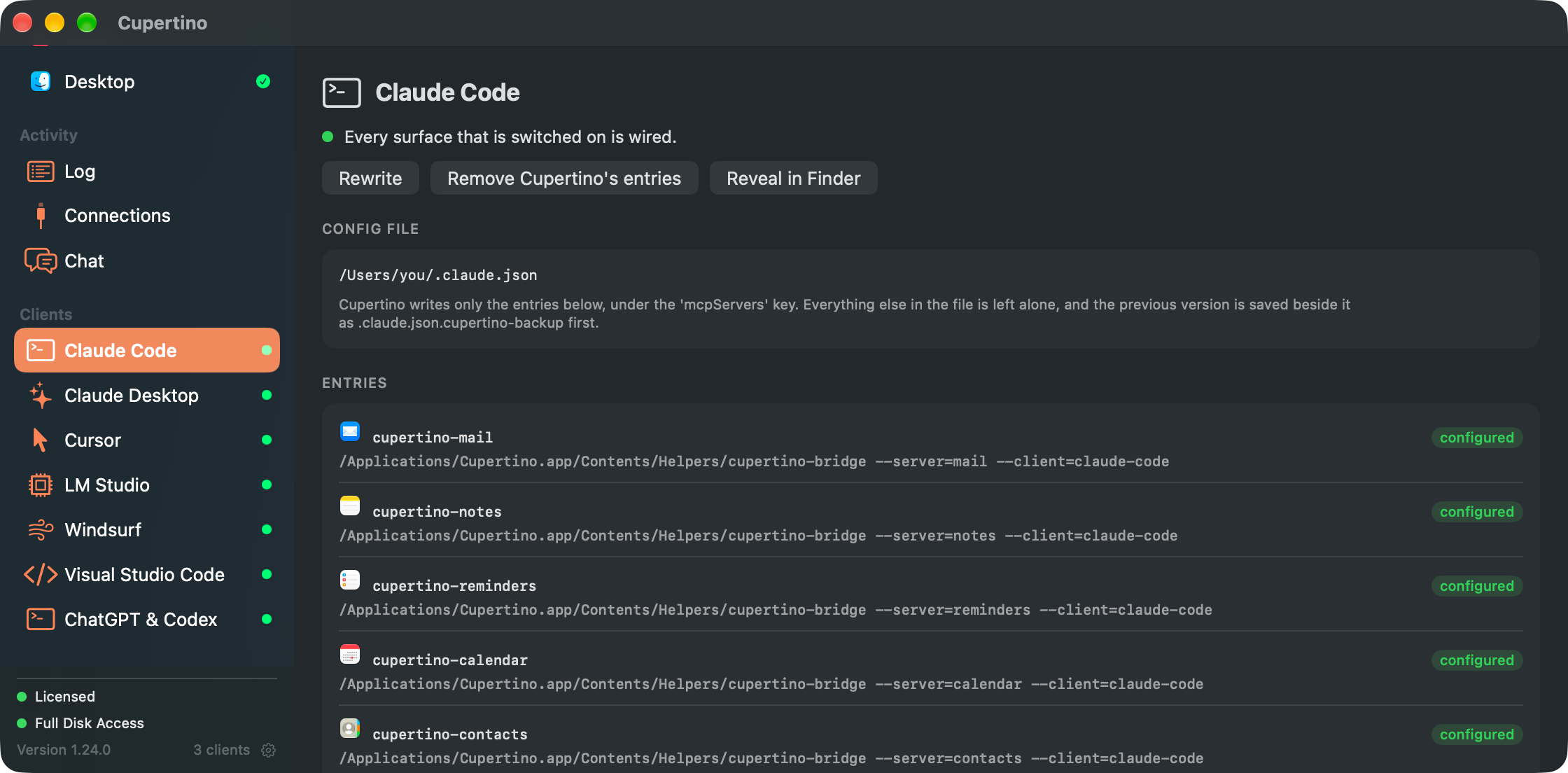
Claude Code, Claude Desktop, Cursor, LM Studio, Windsurf, VS Code and Codex are all configured with one click — merged into the config you already have, backed up first, every other key left alone. Nothing is left to paste. Each client gets a pane showing the file: what would be written, what is under those keys now, and the servers in there that Cupertino did not write. Turn a surface off and the write takes it back out.
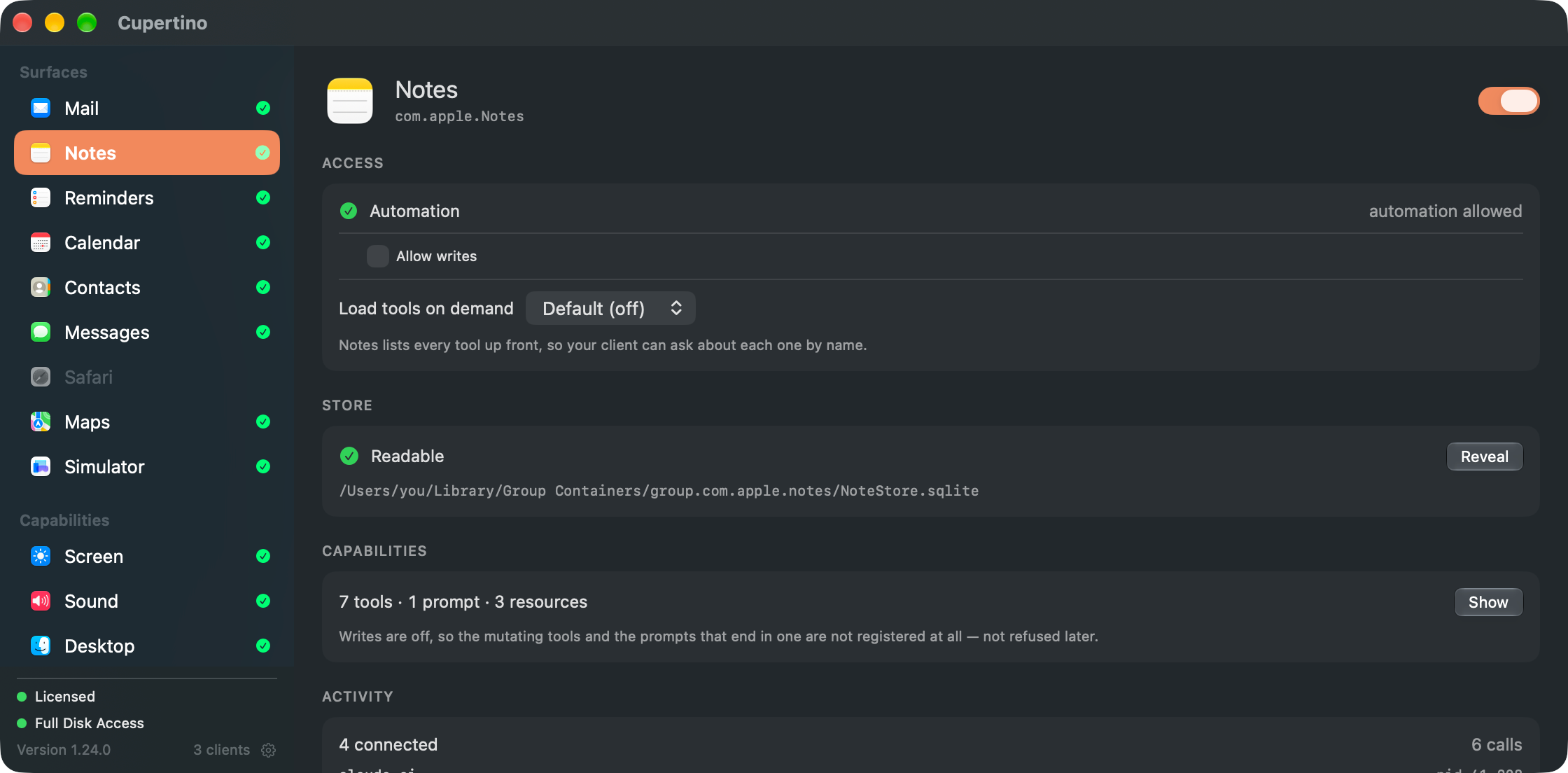
The Mail pane from the top of the page, on a surface with writes off. Notes reports seven tools where Mail reports twenty: the mutating tools, and the prompts that end in one, are not registered at all. An agent is not refused — it is never told they exist.
Same query, same mailbox. Apple Events makes Mail.app do the work one message at a time; the index lane reads the Envelope Index directly. Reading the index is the easy half — Mail owns that file and is still writing to it, so every result carries how old the index was and whether the read could see the write-ahead log at all.
drawn to scale — 0.13% of the bar above
A search result carries indexAgeSeconds, and a warning when the index could only be opened immutable — which skips the write-ahead log, so the newest mail is exactly the mail most likely to be
missing. A fast wrong answer is the failure mode every indexed reader shares; saying so is
the part that is optional.
Without the grant, Notes still works fully below roughly 5k notes; Mail search
falls back to the 74-second path. Tools that need the
index never disappear — the tool list is a pure function of allowWrites and nothing else, so they return a structured degraded result naming what is absent.
macOS has no body index to borrow — Mail keeps none, and Spotlight excludes ~/Library outright. So the index narrows the query and only the survivors are read, which makes cost linear
in how well you filtered. Past the bound it refuses and says so.
log scale · measured against 181,734 messages
degraded: true
capability: "body-scan"
reason: "6566 messages match the other filters, above the
          2000-message body scan bound. Nothing was scanned,
          so this is not "no results"."
hint: "Narrow with mailbox, account, sender or dateFrom and
        try again — a body search over a few hundred candidates
        is near-instant."
| Approach | Speed | On disk | Upkeep |
|---|---|---|---|
| Ask Mail directly What an AppleScript-only reader is left with. Measured, not estimated. | 74 s for one filtered query | nothing | nothing |
| Build a full-text index A second copy of the archive, 365 s to build and stale the moment mail arrives. | fast, including unbounded | 2.2 GB | forever |
| Narrow, then read What Cupertino does. The index narrows; only the survivors are read. | 48 ms – 3 s when filtered | nothing | nothing |
Safari's own way to let a program read a page is a single switch that grants every program access to every tab, and whose state cannot be read back. Cupertino ships a Safari extension instead: you allow it one website at a time, in Safari, and take it back the same way.
| Route | What it can read | Taking it back |
|---|---|---|
| Allow JavaScript from Apple Events Safari's built-in route, and a skeleton key. Any process that can send Apple Events can then run script in any tab. Its state cannot even be read, so nothing can tell you whether it is on. | every site, every tab | one hidden switch |
| Apple's Safari MCP server safaridriver --mcp, in Safari 27. Built for the page you are developing: it opens its own automation window with none of your logins, history or tabs, so it cannot read what you are browsing and does not try to. | a separate automation window | one switch, Developer settings |
| Accessibility Not a route at all. Safari renders pages out of process and exposes no web area, so the lane that reaches other apps' windows reaches no part of a web page. | nothing | — |
| A Safari extension What Cupertino does. Safari asks per website and you answer per website — the permission is visible in the browser you already trust, and revoking it is one click in the same place. | the sites you allow | per site, in Safari |
Apple's server and this one are not rivals for the same job. Theirs drives a fresh WebKit window for the page you are building; nothing in it is yours yet. This one reads the Safari you already use — what you visited, what is open, what you saved for later — and hands an assistant the page in front of you. Run both: one for the code, one for the browser.
everything about the past
what is open right now, and nothing it says
what a page actually says
They see almost disjoint things and fail independently, so one of them being unavailable is normal rather than broken. An ungranted Safari server is not a slower one — it is a smaller one.
The extension captures a page when it loads; nothing reaches into Safari to fetch a fresh copy. So a result is what that page looked like then, and every one carries the time it was taken and how long ago that was. Read something captured twenty minutes ago and it tells you it is twenty minutes old, rather than letting an assistant describe a page you have already left as the one on your screen.
Each of these brokers one Apple app, and all but Simulator are their own npm packages, so a host loads only the tools it wants — and write tools against Mail and against Reminders are not the same risk. They share one bundle and one grant, which is the whole reason they live together.
The deep one. Search, read, threads, attachments and message source across accounts and mailboxes; ten mutating tools behind the write gate.
@mgcrea/mcp-apple-mail Search, read and attachments across every folder and account, with six mutating tools behind the write gate.
@mgcrea/mcp-apple-notes Lists, due dates and search across every account, with five mutating tools behind the write gate.
@mgcrea/mcp-apple-reminders Ranges, search, free time between events, and repeating events expanded properly, with three mutating tools behind the write gate.
@mgcrea/mcp-apple-calendar Turns a phone number into a name, and creates or edits a card. Reads need no Automation prompt at all; only the two write tools do.
@mgcrea/mcp-apple-contacts Reads iMessage, SMS and RCS straight from chat.db — including the messages SQL cannot see — saves attachments, and sends, behind the write gate.
@mgcrea/mcp-apple-messages The places you saved: favourites, Guides and recents, with real coordinates and addresses — including the ones filed in no Guide, which the app itself only shows in a union view. Saves and removes favourites behind the write gate, and — when Cupertino is hosting it — saves places and files them into Guides through the app's own interface.
@mgcrea/mcp-apple-maps History, live tabs, the Reading List — and, through a Safari extension you enable per website, what a page actually says, plus clicking and typing on it. Opens a URL or saves one for later behind the write gate.
@mgcrea/mcp-apple-safari An iOS Simulator is a Mac window, and Simulator.app bridges the simulated device's accessibility tree into it. This reads an iOS app's own controls as named, pressable elements in iOS points — the same coordinates the simctl-based tools use — and behind the write gate presses, taps, swipes and types, with no WebDriverAgent runner to keep alive. Scoped to the Simulator alone; no switch widens it.
— Mail without the grant — Accounts, mailboxes and writes only — search falls back to the 74-second path.
Notes without the grant — Fully usable below roughly 5k notes with no grant at all — only attachment bytes need it.
Reminders without the grant — Workable over Apple Events — the file lane is what makes search scale.
Calendar without the grant — Nothing — the only surface with no Apple Events read path fast enough to be a fallback.
Contacts without the grant — Nothing — but it asks for the Contacts permission rather than the whole disk, and unlike Full Disk Access that one prompts.
Messages without the grant — Nothing at all. Every read through Messages' own scripting interface fails, so this is the one surface with no second lane to degrade to.
Maps without the grant — Nothing at all — Maps is not scriptable, so the grant is the only way in.
Safari without the grant — Live tabs and page contents — the only things in the whole bundle that work with no Full Disk Access at all. Tabs need an Automation grant; page contents need the extension, allowed per website.
Simulator without the grant — Which simulators CoreSimulator knows and which are booted, read from its own plists. Everything on the device's screen needs Accessibility, and refuses by name until it is given.
These broker the system rather than an app, and the contract is different in every way that matters. Each arrives off until you switch it on, each needs its own permission rather than the shared one, and none of them is an npm package — nor could be. The grant lives in the app, so a published package would hold nothing.
A picture of a window your assistant is already working with — Mail, Safari, Calendar — written to disk and handed back as a path. Only the apps Cupertino brokers: never an arbitrary app, window, display or region. Nothing is raised or focused, and a window sitting behind another app still captures its own content.
Without the grant — Nothing — Screen Recording is the only way in, and it takes effect on relaunch.
Your Mac's speakers and microphone. List the audio devices, read and set the volume, mute, switch to your headphones — none of which needs any permission — and, behind a separate switch that is off by default, record a memo to a file. Recording is never hidden: macOS shows its orange indicator, naming Cupertino, for as long as it runs.
Without the grant — Devices, volume and mute all work with no grant at all. Only recording needs the Microphone permission.
The lane for apps that have no other one. Maps ships no scripting dictionary at all, so Apple Events cannot write to it — not slowly, not at all — and the accessibility interface is the only way a place gets saved. Reads a window as named, addressable controls rather than pixels, and behind the write gate, presses them. Scoped to the apps Cupertino brokers unless you widen it, which is the switch that lets it drive an app you are building.
Without the grant — Which apps are running, and nothing else. Accessibility is the grant that matters here rather than Full Disk Access, and every read past the app list refuses by name until it is given.
One Full Disk Access grant, held by a notarized binary from an identifiable developer, instead of four grants handed out to whichever editors happened to spawn a server. The servers themselves stay MIT and free forever.
One price, and it covers all 12 surfaces — the whole set the probes mapped. There is no ladder here any more and no rise announced: what a licence costs is what this page says it costs on the day you read it, and buying it fixes your side of that for every 1.x release.
Run the servers on their own and pay nothing. The servers are MIT and always were — they need no key, and they do the work. What a licence buys is the app: the signed and notarized binary that holds one Full Disk Access grant on their behalf, and the work of keeping it working. Its source is public for a reason that has nothing to do with price: nobody should grant Full Disk Access to software they cannot read. Read it, build it, run your own — the licence is explicit that any build asks for a key, rather than leaving you to find out at the first run.
The trial is held in memory and never written to disk, so quitting Cupertino and opening it again starts another one. Nothing stops you and nothing pretends to. When the window closes it closes properly: the servers it started are stopped, and your assistant reports a dropped connection. A deadline named on the button that started it is not a window if it cannot shut.

One MCP server, running once.
Cupertino holds one grant for the Apple apps. Bastion does the same job for every other server you connect: one supervised process per profile instead of one per editor, credentials in the Keychain, and every tool call recorded.

Every coding agent, on one screen.
A menu bar app for the agents on the other end of those servers: every Claude Code and Codex session on your Mac, what each one is doing, how full its context window is, and how much of each plan is left, read locally from what the agents already write to disk.
Signed with a Developer ID and notarized by Apple. One payment covers every 1.x release, on every Mac you own — or run every surface for 30 minutes first and decide afterwards.
brew install --cask mgcrea/tap/cupertino macOS 26 or later · 30-day refund · SHA-256 · release notes